



Graphic designers frequently hear the terms SPI, PPI, LPI, and DPI used interchangeably. Many call everything DPI. Does it matter how you term it? Yes.
Mostly, these terms apply to printing reproduction, where they describe different stages in the transformation of an image from original artwork to printed ink on paper.
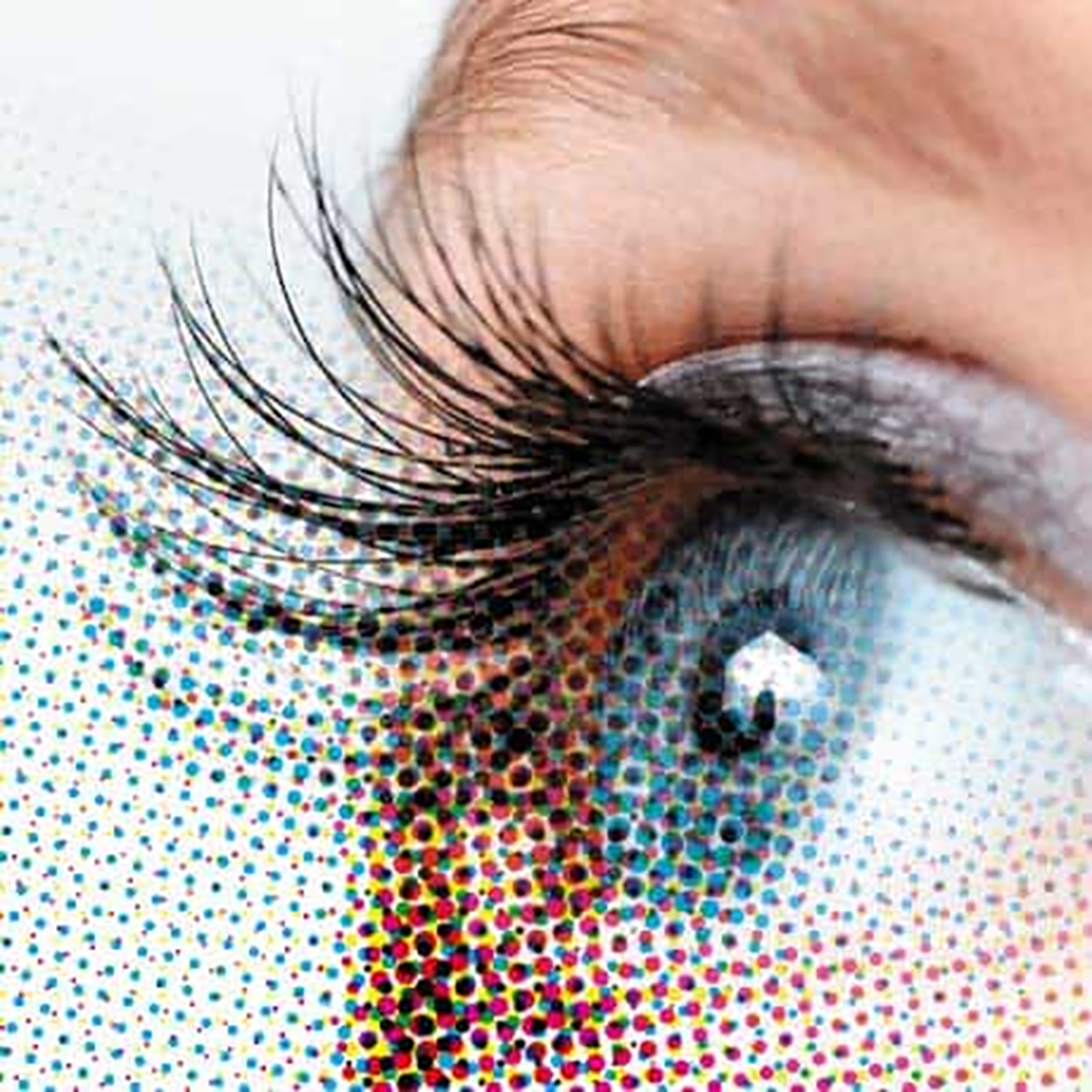
Basic to an understanding about printed images is knowing what the halftone dot fineness is, measured in halftone lines per inch (LPI). A common resolution in printing is 150 LPI. Starting with this number helps designers prepare images that reproduce cleanly on press because they have enough pixels to translate to a clear halftone image.
The larger LPI spot dots, commonly 150 LPI, are composed of clumps of the smaller DPI device dots, which are commonly 2400 dots per inch. The tiny DPI dot is also used primarily to image the solid parts of the printed page such as type characters and lineart shapes. Therefore, whenever a graphics person says DPI, they generally mean PPI or LPI.

This aging term linescreen is a holdover from the printing industry at a time when the stat camera operator laid a physical screen over litho film to then expose and develop the litho film to produce dots which resulted from light shining through the screen. Lined screens make “spot dot” patterns for halftone image reproduction. This is all done digitally now, but the old terminology, confusingly, still exists.
A still-valid and useful tradition in a printing workflow is to set images that will be imaged at a resolution of 300ppi at so many inches wide by so many inches tall in order to get to a halftone output of 150 lpi on press.
In practice, an image passes through four conditions:
- SPI — sampled pixels per inch when the image is captured by a camera or scanner producing pixels
- PPI — pixels per inch is when a digital image resolution is set to so many pixels per inch if you were to print it out physically; yet this is not related to how you display it on a monitor screen
- LPI — linescreen dots per inch (halftone screen spot dot frequency) for halftone reproduction for process printing on press
- DPI — device dot resolution is the printer or imagesetter smallest dot capability
The first two terms, SPI and PPI, describe a non-physical capture of color information stored as math numbers in a computer file that describes the color, pixel-by-pixel. The latter two terms, LPI and DPI, relate to converting that non-physical math color information into cyan, magenta, yellow, and black halftone spot dots which are physical dots of ink applied to paper in process color printing that simulates a picture.
In workflow, a print graphic artist almost never really means to say DPI. Usually, they are describing PPI. A print graphic designer publishing to a digital document needs to know: “Do I have enough pixels for screen display and if I want to print the image on the page of a document at a certain physical size?”
When any graphics person says: “This is a high-res image,” they are not imparting accurate information. This imprecise statement might imply that the image is set to 300 PPI when saved in Photoshop editing. It might imply that there are a lot of pixels in the file. It might imply that they think the image is suitable for quality image reproduction at a certain physical size on paper of a certain size. But it is a vague expression.
So, for any given original scanned image, a print graphic artist needs to know several things: How many actual pixels are in the original file? This is usually described as how many pixels wide by how many pixels tall. An image can also be described as, for example, 12MP, which stands for mega pixels or millions of pixels. Many smartphone cameras take a picture that is 3000 by 4000 pixels, or 12MP. They also need to know what the image resolution is set to, if printed. Many files will originate as set to 72ppi by default or by tradition. Or the image may originate or be reset to 300ppi in professional digital cameras or in Photoshop editing.
Going deeper, a graphic artist needs to know whether there are enough pixels to reproduce at the required reproduction size. For example, there may be 2400 x 3000 pixels to reproduce an 8” x 10” picture at 300ppi in order to get 150 lpi halftone spot dots, but the same file might not be enough pixels to reproduce the image at 48” x 60”. The resolution would fall to 50 ppi. The more you scale up a picture in reproduction, the less PPI image resolution you have. Go too low, and the image seems stair-steppy, crunchy, jaggy, coarse, and lacking in detail.
Note: The term Halftone is the reprographic technique that simulates continuous-tone imagery through the use of dots, varying either in size or in spacing, making a gradient-like effect visually. Reprographics is the technology and process of reproducing, copying, and duplicating documents, drawings, and images using mechanical or electrical methods like photocopying, scanning, and digital printing.
Generally, a digital producer for web screen content doesn’t need to use any of these terms. What they are concerned with is how many pixels wide by how many pixels tall displayed on a monitor/screen that is so many pixels wide by so many pixels tall. Essentially, they are describing “Do I have enough pixels to cover the screen/monitor region?” They don’t care about what the resolution is set to, since that is a physical printing consideration. Nonetheless, an early habit in computers and Photoshop was to set the image resolution to 72 ppi, which matched the monitors and laser printers of the late-1980s to the early-1990s. It gives rise to the tradition of setting all web screen graphics to 72 ppi, but really, that number could be set to anything. On the other hand, it is perfectly fine to leave the web graphic traditionally set to 72 ppi. It doesn't hurt anything.
Image Acquisition: Samples per Inch (SPI)
When physical artwork or photography is digitized, an optical device such as a camera or a scanner captures samples of light intensity and color. The density of these is expressed as SPI (sampled pixels per inch). Each sample recorded by the camera or scanner becomes a pixel in the digital image file. For example, scanning a 4×6 photograph at 600 spi produces a digital image 2400 × 3600 pixels in size.
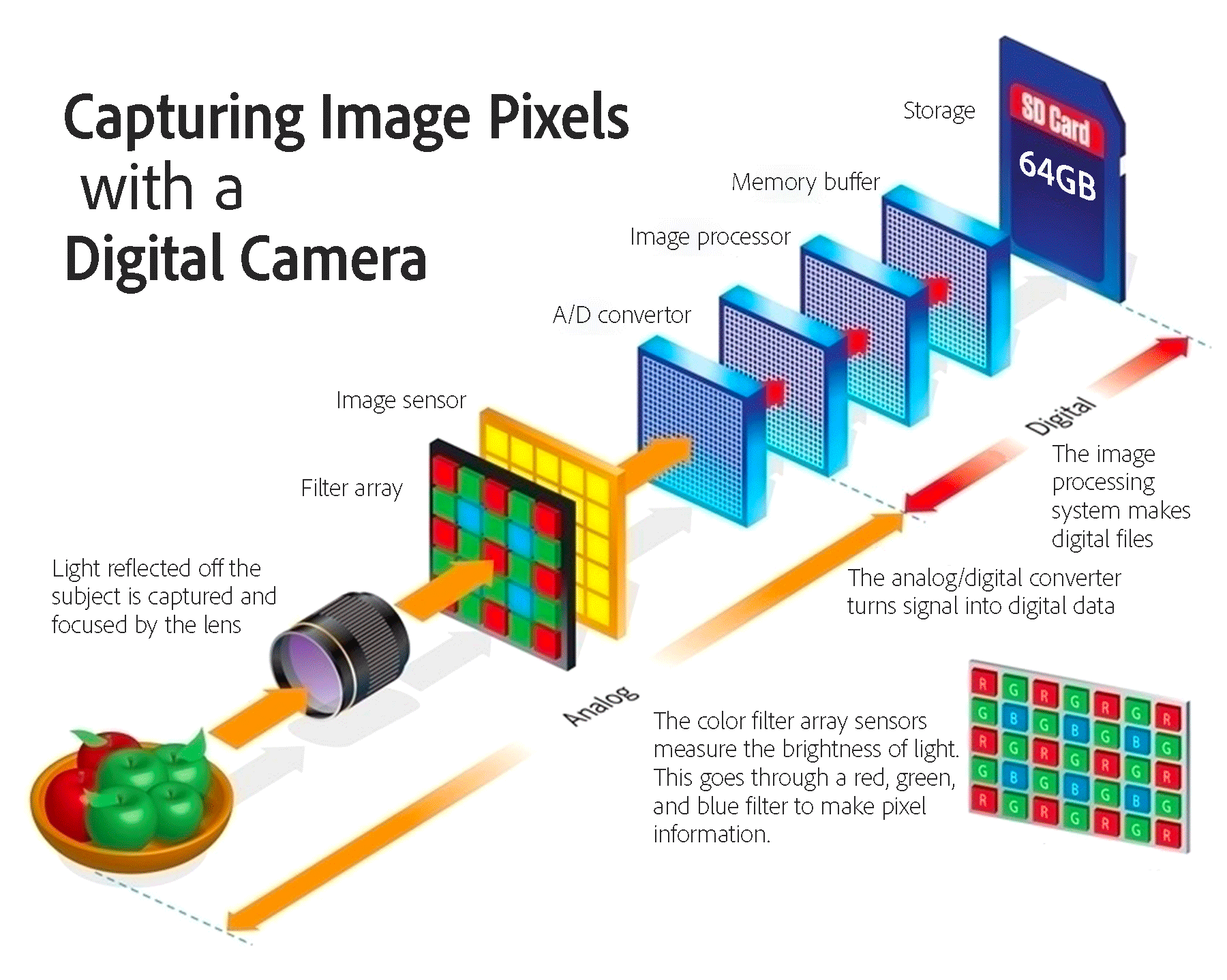
Higher SPI values allow the camera or scanner to capture finer detail from the original source, which is important for photographic reproduction, archival scanning, and artwork intended for enlargement. If the sampling resolution is too low, fine detail from the original image is never captured and reproduction looks coarse.
Digital Image Resolution: Pixels per Inch (PPI)
Once captured and stored, image information exists as a non-physical grid of pixel colors. The density of these pixels relative to the intended printed size is measured in pixels per inch (PPI).

Here are some examples of pixel count divided by pixels per inch resolution to equal physical length by width, if printed:
|
Image Size (Physical) |
Pixel Width and Height |
Resolution |
|---|---|---|
|
5x5 inches |
1500 pixels |
300 PPI |
|
5x5 inches |
750 pixels |
150 PPI |
The first image contains twice as much detail per inch. As you double the resolution, you get 4 times the amount of pixels in the file, since it is 2x the width and 2x the height of the pixel count of the image.
For most commercial printing, images prepared at 300ppi at final print size provide sufficient detail for accurate halftone reproduction. However, digital pixels cannot be printed directly. Pixel-based image colors must first be translated into halftone patterns of physical ink.
Halftone Screening: Lines per Inch (LPI)
In physical printing, tonal variation is simulated using halftone dots. A halftone screen divides the image into a grid of cells. Each cell contains a dot whose size varies to represent tone. The density of these cells is measured in linescreen spot dots per inch (LPI).
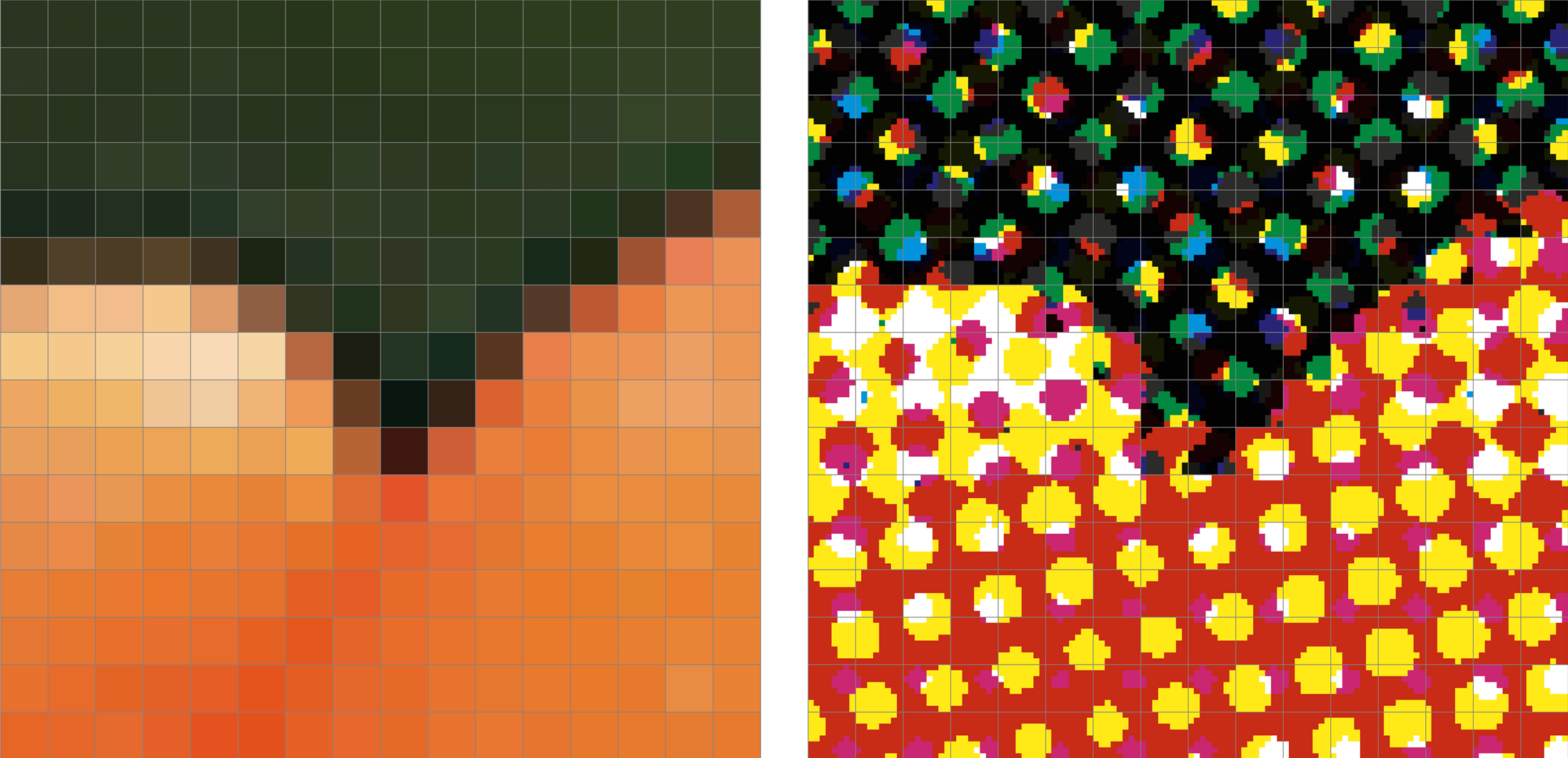
Non-physical image pixels (above left) must be translated through the RIP to become printed linescreen spot dots (above right).
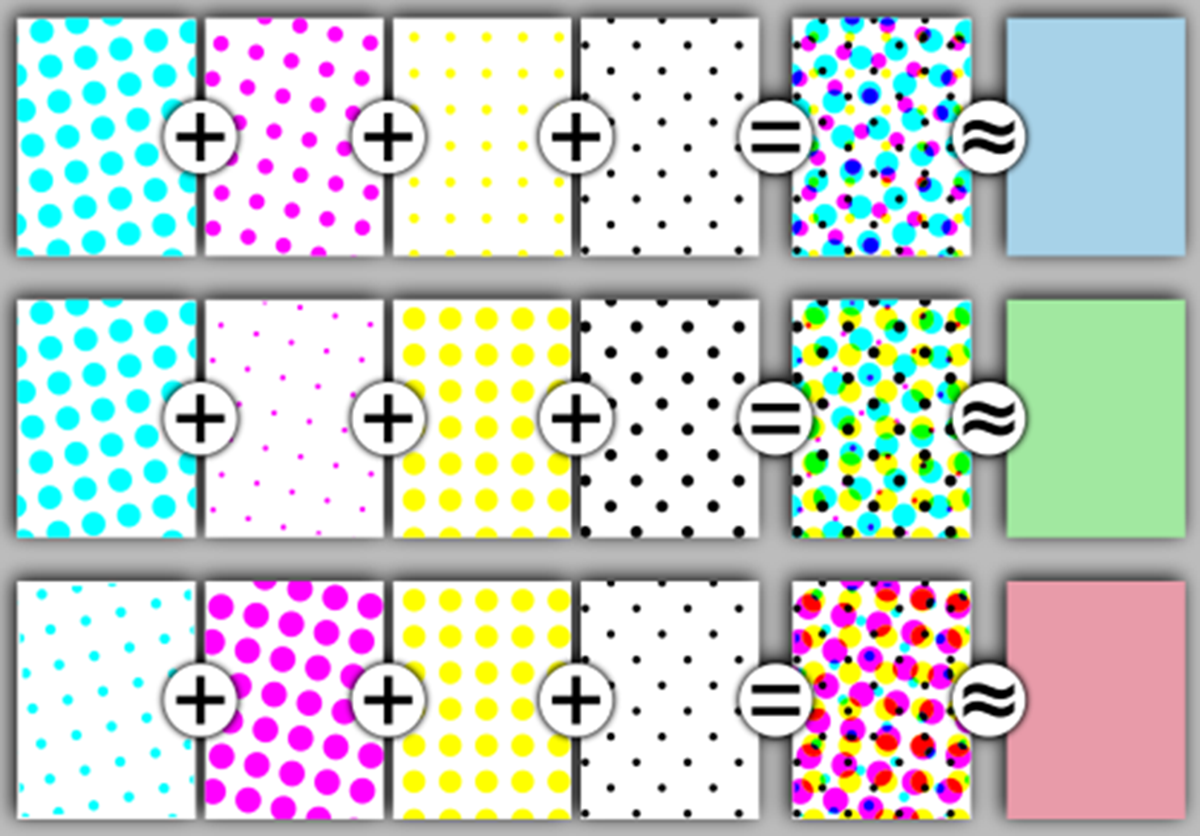

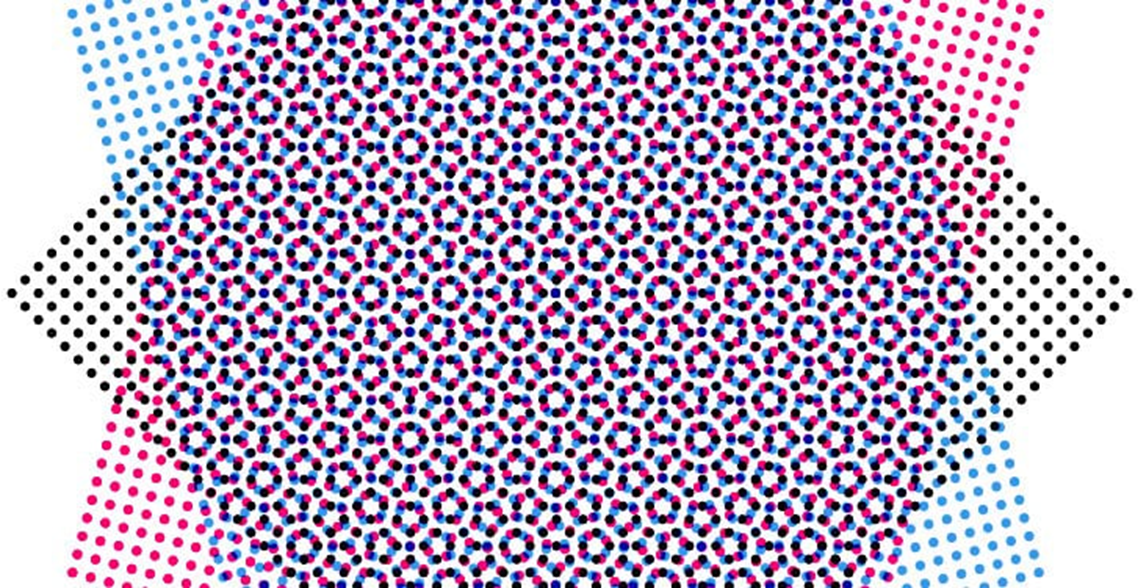
Printing presses print on different kinds and grades of paper, from rough newsprint to fine coated-stock papers. Printing presses print with inks that differ in viscosity. Coarse newsprint can image coarse halftone images. Better printing on finer paper with thicker ink can print finer halftone screen frequencies. Here are some typical halftone screens used in different qualities of commercial printing:
|
Printing Application |
Screen Frequency |
Enough Image Resolution |
|---|---|---|
|
Newspaper printing |
85 LPI |
At least 170 PPI |
|
Commercial offset |
133–150 LPI |
At least 300 PPI |
|
High-quality art books |
175–200 LPI |
At least 360 PPI |
A widely used guideline in prepress is: Acceptable image PPI is approximately equal to expected halftone LPI multiplied by 2. This is a simplification of an earlier calculation that enough PPI is equal to expected halftone LPI multiplied by 1.4. The idea here is to know whether you have enough pixels in the image for output to physical halftone dots for the reproduced image. This multiplier of 1.4 or 2 gives you a minimum acceptable amount of pixels threshold that renders a clearly detailed image. Therefore, it is OK to have more than the minimum amount of pixels; but it is not OK to have less than the minimum amount of pixels in a digital image file asset.
A current viewpoint in production workflow is to not down-sample the original image at all, but rather leave it at the full pixel count of the original image asset in order to get the best quality of reproduction when you export to a prepress PDF at 300ppi. Of course, differing people and differing workflows have differing practices.
This easy-to-calculate 2x multiplier rule ensures that the digital image contains enough pixel data to describe halftone dot transitions accurately. Related to that rough calculation are a couple of things to bear in mind:
Since we round up to 300ppi, and that is more than enough when 1.4x is considered the technically correct amount, then you should know that images with an effective PPI as low as 225ppi will also look just fine when printed as halftone spot dots. Since 300ppi is more than enough, and 225ppi is enough; than any number in between is also going to translate well to a detailed halftone dot print. What if your image is effectively set to greater than 300ppi, for example, 305ppi? Again, you are in the ballpark, and it will translate to halftone spot dots just fine. More than enough pixels is going to image well. Falling below 225ppi might start to show visibly less detail in the halftone reproduction.
Device Output Resolution: Dots per Inch (DPI)
The final stage of the imaging process occurs within the output device. Here, the image is rendered using extremely small physical marks—ink droplets, toner particles, or laser light exposures—making what is called device dots. The density of these marks is measured in dots per inch (DPI). Unlike pixels or halftone cells, these dots are the smallest controllable marks a printing device can produce.
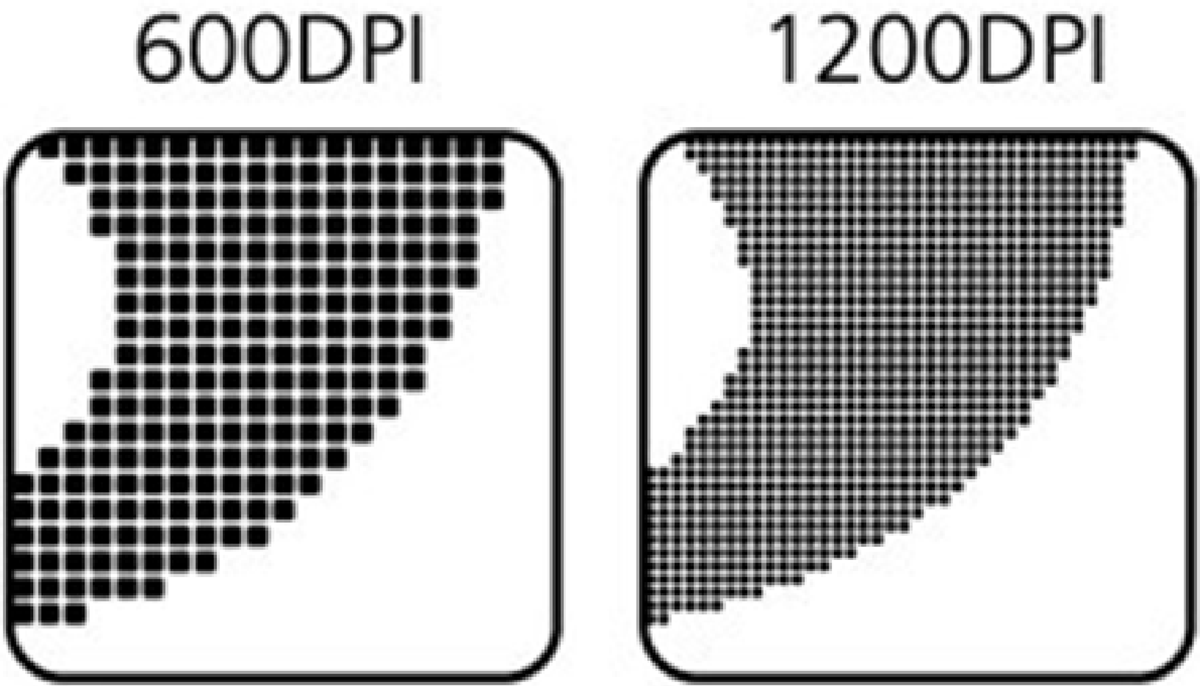
Typical device resolutions include:
|
Output Device |
Typical Resolution |
|---|---|
|
Desktop laser printer |
600–1200 DPI |
|
Professional imagesetter |
2400 DPI |
|
High-end platesetter |
2400–4800 DPI |
These tiny dots pattern together to build the larger halftone dots used to reproduce image tone. Also, these tiny device dots pattern closely together to build what looks like solid regions of type and lineart.
The Role of the Raster Image Processor (RIP)
The Raster Image Processor (RIP) is the software system that converts page layouts and images into the precise dot patterns required by the output device. The RIP translates pixel-based images into halftone cells composed of device dots. Its tasks include:
- Interpreting Printer Control Language (PCL), Adobe PostScript, or Portable Document Format (PDF) page/picture descriptions
- Applying halftone screening algorithms to images and vector graphics to make device-resolution dots
Mathematical Relationships Between LPI and DPI
A halftone cell occupies a square area defined by the screen frequency. For example, 150 LPI means each halftone cell is 1/150 inch wide and tall. Inside that cell, the printer uses its device resolution to place dots. Device dots per cell dimension = device DPI ÷ LPI. For example: 2400 DPI device with 150 LPI screen: 2400 ÷ 150 = 16 dots per width and height. This is a 16 × 16 grid of device dots, or 256 possible dot positions per halftone cell. This structure allows the RIP to build smooth tonal gradations between highlights and shadows.
|
Device Dot DPI |
Typical Linescreen in Printing |
Dots per Cell |
|---|---|---|
|
1200 DPI |
85 LPI |
14 |
|
2400 DPI |
150 LPI |
16 |
|
3600 DPI |
200 LPI |
18 |
Because 133–175 LPI screens are widely used in commercial offset printing, 2400 DPI provides enough dot precision to render these screens smoothly without excessive processing time and hardware cost.
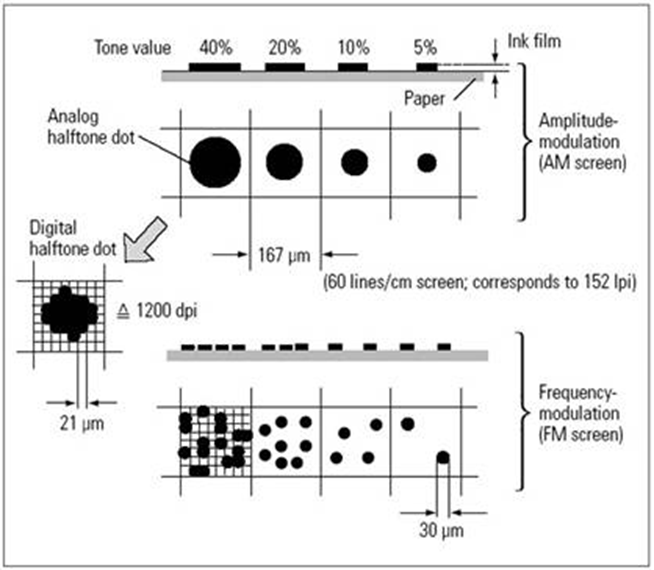
Stochastic (FM) Screening is a different way to image a halftone
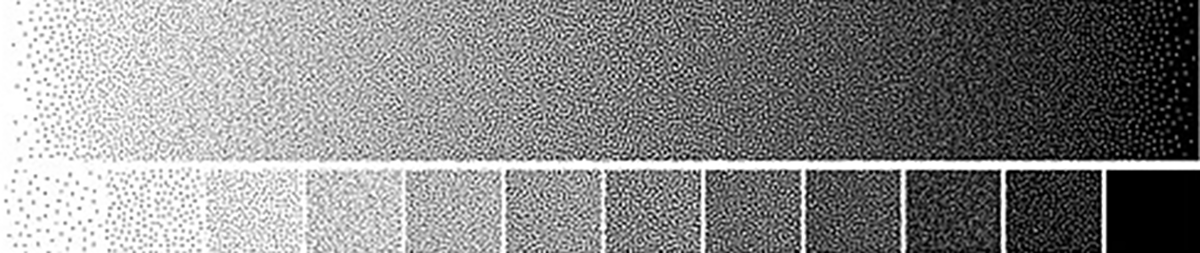
Halftone screens can be amplitude modulated (AM) screens where the spacing distance of the dots is the same and the size of the dots vary larger or smaller. But another way to make a printed halftone is by using stochastic frequency modulated (FM) dot patterns where the dots are the same size and the spacing and number per cell can vary. The result resembles fine photographic grain rather than a regular grid of dots. Sometimes, AM and FM may be blended, such as when the least dense inks like yellow are stochastic, while the rest is traditional rosette patterns. Advantages of stochastic RIPs include: reduced moiré patterns, smoother gradients, improved detail reproduction.
Because FM screening does not rely on a fixed halftone grid, the classic 2x LPI rule for image PPI becomes less rigid, though 300–400 PPI images still provide excellent detail.
Printed Image Dots
Imagine zooming into one square inch of a printed photograph. At different magnifications, different structures become visible.
- At the digital level: 300 PPI produces 90,000 pixels per square inch
- At the halftone level: 150 LPI produces more than 22,000 halftone cells per square inch
- At the device level: 2400 DPI produces more than 5 million device dots per square inch
Each kind of “dot” is related to the next:
- DPI physical device dots clump together to build halftone dots (LPI)
- LPI physical halftone dots are translated from pixel math numbers (PPI) through the RIP
- Pixels representing the original image are stored in computer memory non-physically
Summary Understanding
We begin with finding out how many pixels wide and tall is the image; and what is the resolution set to as related to a physical print size. If for print, we need to also multiply that by the reproduction size relative to that original. The bigger the reproduction, the more pixels you will need.
An image to be printed is not defined by a single resolution value. Instead, it passes through multiple conditions, each describing a different stage of reproduction, starting with the non-physical pixels and ending with the physical printed image composed of LPI spot dots which are made from smaller DPI device dots.
|
Stage of Workflow |
Measurement |
Description |
|---|---|---|
|
Image capture |
SPI |
Optical sampling pixel resolution |
|
Digital image |
PPI |
Pixel density of the image, if printed at 100% scale |
|
Tone reproduction |
LPI |
Halftone screen spot dot frequency |
|
Output device |
DPI |
Smallest physical dot resolution of printing device |
Understanding how these measurements interact allows designers to prepare images that translate through the Raster Image Processor (RIP) and onto the press, producing high-quality printed results.
Understand the difference in these basic terms:
- SPI captures the image as a grid mosaic of pixels which are numbers which represent colors
- PPI stores the image as a grid of numeric color pixels, plus a chosen size and resolution if printed at 100%
- LPI is the conversion from non-physical color pixel information into 4 physical ink colors to simulate tones for color printing. Despite the misnomer label of linescreen, these are halftone spot dots.
- DPI physically renders the dots that produce the final print; both the solid regions and the larger LPI spot dot halftone picture regions
An image meant for screen/web use does not consider LPI and DPI and PPI, since it is not meant to be printed. The only thing that matters is how many pixels wide do you want to display it, along with how many pixels tall do you want to display it. Either make it that specific pixel size in Photoshop editing, or use the web page XHTML code attributes to define how wide and tall it displays. The browser working with the XHTML code attributes actively scales the image to display on the screen/monitor/device, especially in responsive-design where the code has to adapt and change based on the device, the screen size, the pixel count, and the orientation of the device.
An image meant for print reproduction needs to know what size in inches wide and tall it is being reproduced/printed times 300 pixels per inch in order to get to how many pixels are needed in the original image scan or file. It isn’t a question of asking whether this is “high-rez” or “low-rez”. It is not enough to say that it is high-rez because it is set to 300ppi. It is misleading to say that it is low-rez simply because it is set to 72ppi. It is a matter of knowing what is “enough rez” for the size you wish to reproduce the image in ink on paper. This can be further complicated by knowing the intended viewing distance of the print reproduction. Something printed on paper and viewed in hand needs more resolution than something viewed from 12 feet away. Many times, posters for public display can be imaged as low as 72ppi because they will not be viewed from close up.
The bottom line is this: most of the time when used, the print graphic design technician meant to say PPI, and the web screen designer doesn't really need to use any of these 4 terms. ▪